 Olu
How to Find Gaming Friends: Where Adults Find People to Play With
How to find gaming friends as an adult: LFG tools, Discord servers, subreddits and forums, how to pick a good group, handle time zones and stay safe online.
Updated 19 November 2026 · 10 min read
On this page
- Why it's harder to find gaming friends as an adult
- Where to find people to play games with
- How to write an LFG post people answer
- How to pick a good gaming group
- From random teammates to real gaming friends
- Gaming friends in other time zones
- Finding players on the Gamers planet
- How to stay safe when gaming with strangers
- When it still isn't working
You've got a game you love and nobody to play it with. Your old friends stopped playing, work changed your evenings, or the people you know are on a different platform. Solo queue gets old fast. The good news: millions of adults are looking for exactly the same thing, and there are well-worn places to find them.
This guide covers how to find gaming friends as an adult: where to look, how to write a post people answer, how to tell a good group from a bad one, how to handle time zones, and what never to share with someone you met in a lobby.
The short answer: use your game's own looking-for-group tool first, then its official Discord server, Discord's server directory, gaming subreddits and Facebook groups for your game. Post one specific request with the game, platform, region, time and mood. Play a few sessions with the same people, then ask the ones you enjoyed to make it regular. Never share your login, never send money or gift cards, and block and report anyone who harasses you.
Say your game and when you're free
Why it's harder to find gaming friends as an adult
As a teenager, the people you played with were the people you saw every day. As an adult, your gaming time is a narrow window, often late at night, and the people around you may not play at all. Random matchmaking puts you next to strangers, but you rarely see the same ones twice.
Still, games really do bring people together. In the Entertainment Software Association's 2025 survey of 5,000 US players, 78% said games can introduce them to new friends and relationships, and 61% of millennials said they had met people through games they would not otherwise have met. The players are out there. The work is getting from "random teammate" to "the person I play with on Thursdays".
Where to find people to play games with
Your game's own LFG tools
Many games and platforms have a built-in way to find players. On Xbox, Looking for Group lets you browse posts for the game you're playing or create your own. MakeUseOf's guide to Xbox Series X|S describes it: open the guide while the game is running, go to Game activity, then Looking for group. A post sets the day, start time, number of players needed and language, with optional tags and a description. Menus change over time, so if it looks different on your console, search your platform's support pages.
Check your own game too. Many online games have a group finder, a clan or guild menu, or an in-game LFG channel. These are the easiest wins, because everyone there already owns the game and is online right now.
Discord servers
Discord is where most gaming communities live. Three ways in:
- Your game's official server. Most big games link to one from their website or launcher. Look for channels named "lfg", "looking-for-group" or by region.
- Discord's server directory. Discord has a public server directory with a Gaming category and a search box, listing each server's online and member counts.
- General LFG servers. Some servers exist only to match players. Looking For Gamers, for example, describes itself as a place to find people to play with across platforms, and listed about 50,000 members when we checked in November 2026.
Read the rules channel before you post. Each server has its own LFG format, and posts that ignore it get deleted.
Subreddits and forums
Reddit has subreddits for nearly every game, and some exist only for finding friends. Bunchups' guide points to r/GamerPals, where people post their games, time zone and skill level. Your game's own subreddit often has a weekly LFG thread too.
Facebook groups work in a similar way. CGMagazine suggests searching Facebook for your game, filtering by Groups, and posting a specific session rather than asking for friends, such as "Looking to team up for Far Cry 5 at 5 pm CST tomorrow."
Older official game forums are slower, but the people there tend to be committed players who stick around.
People you already know
Tell friends, coworkers and family which games you play. Someone you see every week may play the same thing quietly, or know someone who does. CGMagazine makes the same point: ask the people around you whether they know other gamers.
Teammates you clicked with
The most natural route is the one you already have. When a random teammate is fun to play with, add them and say so: "That was a good round. Want to queue again tomorrow?" One easy invitation beats ten forum posts.
How to write an LFG post people answer
Vague posts get ignored. "Anyone want to play?" tells nobody anything. A good post answers every question a stranger would ask before replying:
| Include | Example |
|---|---|
| Game and mode | Deep Rock Galactic, normal missions |
| Platform | PC, crossplay OK |
| Region or time zone | EU, UTC+1 |
| When you're free | Weeknights after 8 pm, my time |
| How many players | LF2 (need two more) |
| Mood and level | Relaxed, no rush, new to the game |
| Voice or text | Text chat fine, mic optional |
The short codes are worth knowing. LFG means "looking for group", and a code like LF3 means the poster needs three more players, as a GTFO community guide explains.
Put it together:
"LF2 for co-op on PC, EU evenings, Tuesdays and Thursdays from 8 pm UTC+1. Relaxed pace, happy to explain the game to new players. Text chat is fine."
Mention the mood. "Relaxed" and "trying to climb ranked" attract very different people, and saying it up front saves both sides a bad evening.
How to pick a good gaming group
Sharing a game is a start, not a match. Over the first few sessions, watch for these:
| Good sign | Warning sign |
|---|---|
| They wait for the slowest player | They blame one person every loss |
| They explain mechanics to new people | They mock mistakes |
| They show up when they said they would | They vanish mid-session, every session |
| The banter is about the game | The insults are about you, your voice or where you're from |
| Losing is still fun | Every loss ends in a fight |
Harassment in online games is common, which is why picking the right group matters. In the ADL's 2023 survey of US gamers, 76% of adults said they had experienced harassment in online multiplayer games. A group with clear rules and active moderators is worth more than a big one.
Start small. Play two or three sessions before you join someone's private server or regular schedule. If a group feels wrong, you owe nobody an explanation. Leave and keep looking.
From random teammates to real gaming friends
Most gaming friendships form the same way: the same people, playing at the same time, again and again. A few habits help:
- Pick one regular slot. "Thursday at 9 pm" is easier to keep than "whenever we're free".
- Remember people you liked. Add them right away, with a short note about the game you played.
- Talk outside the match. A message about a patch, a clip or a new release keeps things going between sessions.
- Move at the other person's pace. PSU's guide suggests building up from text chat to voice once you're comfortable, rather than pushing for personal details or contact early.
- Be reliable. If you can't make it, say so before the session, not after.
If you play co-op with one other person, our list of games to play with two people online has ideas for nights when your usual game gets stale.
Gaming friends in other time zones
Playing with people abroad has real upsides. Someone eight hours away is online when your local friends are asleep, and they know which games are big in their country.
It just takes planning:
- Find the overlap. The timeanddate.com Meeting Planner shows the hours you're both awake for up to three locations.
- Write the time in both zones. "9 pm Seoul, 8 am New York" avoids the classic mix-up.
- Use weekends. A Saturday evening in Europe is a Saturday afternoon in the Americas.
- Fill the gaps. Turn-based games and a running text chat keep things going between live sessions.
Language can be a barrier, but less than you think. Plenty of co-op games need only pings and a few words, and text chat can be translated.
Finding players on the Gamers planet
Olu is a free text chat site for meeting people in other countries, in your browser, for adults 18+. Its Gamers planet is for "players from every server and every time zone". The planet has three rules: say which game, no cheats or account selling, and trash talk the game, not the player.
Its ritual is Squad up: find one or two people to play with tonight. You say the game, your platform and when you're free, and players in other time zones answer when they're on. Member postcards have buttons to Squad up, send a Duo request or just Answer. If you want to play right now, an LFG now request stays open for two hours.
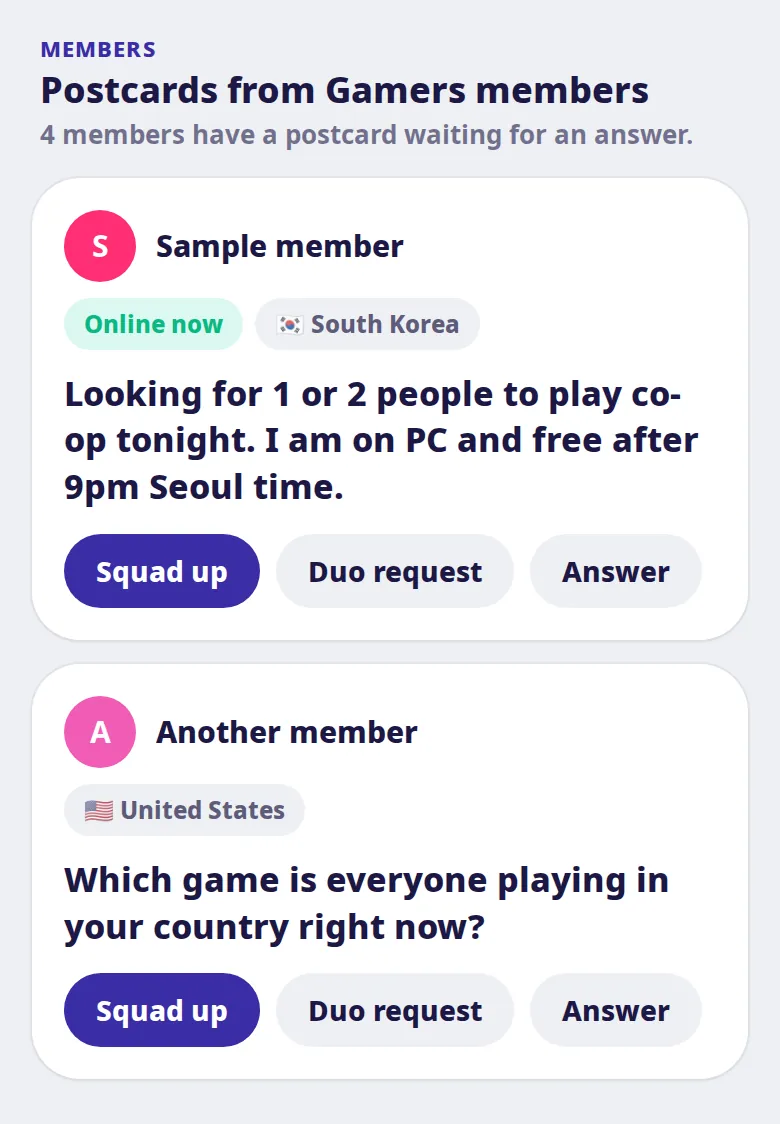 Example screen with sample members, not real people.
Honest details:
- It's text chat only. No voice, no video. You agree on the game and time there, then play in the game itself.
- Every message is translated both ways, with the original visible, so a player who speaks another language can still squad up with you.
- Contact details are stopped before delivery, and report and block are in every chat.
- It's a small community. At quiet hours nobody may answer your request right away.
For more on keeping friendships going across borders, see how to make friends from other countries online.
How to stay safe when gaming with strangers
Most people you meet in games just want to play. A few want your account, your money or your attention in ways you didn't ask for. These rules cover nearly every case:
- Never share your login. Not your password, not your two-factor code, not a "verification" link. Discord's safety tips say you should never give your account password or token to anyone, and that Discord will never ask for them.
- No money, no gift cards, no items. Don't send money, gift cards or in-game items to someone you've just met, whatever the story. The US Federal Trade Commission puts it plainly: "Only scammers will tell you to buy a gift card" and hand over the numbers.
- No account buying, selling or sharing. You can lose the account, and the money with it.
- Be careful with links and files. Don't open unexpected links or download files from people you don't know. "Free" premium offers in DMs are scams.
- Keep personal details private. Use a gaming-only username, and keep your real name, address and workplace to yourself until you know someone well.
- Block and report harassment. You don't have to argue or explain. Use the game's or platform's report tools, and leave any group that tolerates abuse.
- Meeting in person is optional. If an online friend suggests meeting, choose a busy public place, tell a friend where you'll be, travel there yourself, and never send money first.
For more general habits, read our random text chat safety tips.
When it still isn't working
- Nobody answers your posts. Make them more specific, and post at the time you want to play, when people are online.
- Groups fall apart after a week. That's normal. Most people try a few groups before one sticks. Keep the one or two players you liked and build from them.
- Your game is quiet. Pick a second game with a bigger community, or ask in a general LFG server what people are playing right now.
- You only have an hour a week. Say so in your post. Plenty of adults are in the same spot and want a short, regular session, not a nightly raid.
One good gaming friend is worth more than a big friends list. Find two people you enjoy, set a time, and keep showing up.
Questions people ask
+Where can I find people to play games with online?
Start with your game's own tools, such as Xbox's Looking for Group posts, then the game's official Discord server, which usually has LFG channels. Discord's server directory, gaming subreddits like r/GamerPals, Facebook groups for your game and the game's forums are the next places to look. Say the game, platform, region and time you're free.
+What does LFG mean?
LFG means 'looking for group': a post saying you want people to play with. You'll also see LFM ('looking for more') and short codes like LF2 or LF3, which mean the poster needs two or three more players.
+How do I make gaming friends as an adult with little free time?
Pick one game and one regular slot, like Thursday evenings, and post for that slot. A fixed weekly session is easier to keep than open-ended plans. Play with the same few people a few times, then ask the ones you enjoyed to make it a regular thing.
+How do I play with friends in other time zones?
Find the hours you're both awake with a time zone tool, then agree on one slot and write it in both local times. Weekends and early evenings for one person are often late evenings or mornings for the other. Asynchronous games and text chat fill the gaps between sessions.
+How do I stay safe when gaming with strangers?
Never share your account login, password or two-factor codes. Never send money, gift cards or in-game items to someone you've just met. Keep your real name, address and workplace private, and block and report anyone who harasses you. Real support staff will not message you asking for your password.
Keep reading
Boarding pass · free
Tap, fly to a random country, and chat with someone who lives there.
Text first, translated both ways, no video, no coins to meet people. Works in your browser.
Take off on OluNew here? Read Ablo App: The Complete Story of the Chat App That Let You Fly Anywhere (2019–2022), the full history in one place.