 Olu
Coding Buddy: How to Find a Programming Partner and Make It Work
How to find a coding buddy: a real person to pair, review code and stay on track with. Where to look, how pair programming works and what never to share.
Updated 19 November 2026 · 10 min read
On this page
Coding alone has a specific failure mode. You hit a bug, you stare at it for two hours, and you close the laptop. Nobody knows you were stuck, and nobody notices when you don't come back the next day. A coding buddy fixes both halves: someone to think out loud with when you're stuck, and someone who expects to hear what you built this week.
One note before we start. "Coding Buddy" is also the name of several AI assistants and editor extensions. This guide is about people: how to find another programmer to pair, review and build with, and how to make the arrangement last longer than two sessions.
The short answer: a coding buddy is another developer you code with on a fixed schedule, live or by check-in. Look in learning communities (the freeCodeCamp forum, The Odin Project's Discord, CS50 study groups), on r/ProgrammingBuddies, at local meetups, and in open source issues marked "good first issue". Pick someone near your level with overlapping free time. Agree on a goal, a weekly slot and a format (pairing, code review swaps or co-working), and never share keys, passwords or private repo access with someone you've just met.
Stuck on something? Ask a developer who has hit it before
What is a coding buddy?
A coding buddy is a programming partner you see regularly. In practice the arrangement takes one of four shapes:
- Pairing partner. You work on the same code at the same time. One types, one reviews and steers, and you swap.
- Review partner. You each work alone, then read each other's code once a week and leave comments.
- Project partner. You build one side project together and split the work.
- Co-working partner. You work on separate things at the same time and check in at the start and end. This is close to what people call body doubling.
Learners on the freeCodeCamp forum often ask for exactly this. In one typical thread, a beginner working through Harvard's CS50 asked for a buddy at a similar level, and the reply pointed them to CS50's own study groups. Most coding buddies start that way: one post, in a place where other learners already are.
Why code with another person
The practical gains are easy to name:
- You get unstuck faster. Explaining a bug out loud often solves it before the other person says a word.
- Continuous review. A second pair of eyes catches mistakes while they're cheap to fix, not after you've built on top of them.
- You learn what you don't know. A partner shows you editor shortcuts, debugging habits and library choices you'd never search for.
- Accountability. A weekly slot with someone else is much harder to skip than a plan in your head. The same logic is behind an accountability partner.
- Less isolation. Self-taught developers and remote workers spend a lot of time alone with a screen.
What does the research say? The most-cited result is a 1999 experiment at the University of Utah with about 40 senior computer science students. Pairs spent about 15% more developer hours than solo programmers but produced about 15% fewer bugs, as summarised in Tuple's review of pair programming research. That's a small study of students, and later research is more mixed, so read it as "pairing costs a little time and may buy better code", not as a guarantee.
What makes a good coding buddy
| Look for | Why it matters | Warning sign |
|---|---|---|
| Similar level | Both people get to drive and both learn | One person types every session |
| Overlapping hours | Live pairing only works if you're awake at the same time | Every slot needs a 2 am alarm |
| A shared goal | You know what a "good session" looks like | One wants a portfolio project, the other wants to chat |
| Same or similar stack | Less setup, more coding | Weeks spent arguing about frameworks |
| Clear communication | Pairing is mostly talking | Silence, or taking over the keyboard |
| Reliability | The habit is the point | Frequent last-minute cancels |
Brandon Marrero, who met their own pair partner in a bootcamp cohort, recommends someone close to your skill level who still brings a different perspective, with similar availability. If you're a beginner, a much more senior developer is better as a mentor or reviewer than as an equal pairing partner.
Where to find a coding buddy
In learning communities
- The freeCodeCamp forum. Learners post "looking for a coding buddy" threads. Check the date before replying; many are years old.
- The Odin Project. A free, open source web development curriculum whose Discord community is where learners get help with the course. Fellow learners on the same lesson make natural partners.
- Course groups. CS50, bootcamps and university courses often have their own Discord or Facebook groups. People on the same week of the same course have the same problems.
- Exercism. Exercism offers practice in 85 languages and says it is free, with free human mentoring. A mentor isn't a buddy, but it's a good place to get your first code review.
- CodeBuddies. A community that describes itself as a place to learn and chat about code, with a Slack and an always-open video hangout.
On Reddit
r/ProgrammingBuddies exists for this. Posts that get replies are specific: language, level, time zone, goal and hours. "Python beginner, UTC+1, want to build a small Flask app over 6 weeks, free Tuesday and Thursday evenings" works. "Anyone want to code?" doesn't.
Through open source
Many projects tag beginner-friendly issues with the good first issue label, which GitHub's docs say exists so new contributors can find them. Pick a project you use, pick an issue, and ask another newcomer to work on it together. A maintainer's review then doubles as feedback for both of you.
At work and nearby
Coworkers, classmates and local developer meetups are still the easiest route, because trust is already there. If you're employed, ask a colleague to pair on a ticket for an hour. Most people say yes to one hour.
How pair programming works
Pairing has a few standard formats. Birgitta Böckeler and Nina Siessegger describe them in On Pair Programming on Martin Fowler's site:
- Driver and navigator. The driver types and handles the line in front of them. The navigator watches, reviews and thinks about the bigger picture. Swap regularly.
- Ping pong. Built for test-driven development. One person writes a failing test, the other makes it pass, then you switch.
- Strong-style. For teaching. The idea must go through the other person's hands: the experienced partner explains, the newer partner types.
The same article warns that pairing is tiring. It suggests real breaks (not email), Pomodoro-style blocks of about 25 minutes, and no more than about six hours of pairing a day. For learners, one or two hours a week is plenty.
Remote pairing
Remote pairing usually means a shared screen or a shared editor (the Fowler article mentions VS Code Live Share and tmux over SSH) plus a voice call. Microverse's guide to remote pairing suggests a simpler hand-off for learners: separate computers, the driver commits and pushes, the navigator pulls and takes over, swapping every 30 to 40 minutes. It also makes the point that matters most: meet on the same days, at the same time, every week.
How to run your first sessions
Most coding partnerships end because nobody agreed on anything. Settle these in the first message or the first ten minutes:
- The goal. "Finish the to-do app's login page" beats "practise React".
- The format. Live pairing, review swap, or co-working with check-ins.
- The slot. Same day, same time, with an end time. Ninety minutes is a good start.
- The tools. Which repo, which editor, which call app. Use tools you both already have.
- How to cancel. At least a day ahead, in the chat you use.
A first message that tends to get replies:
"Hi, I'm learning Go after a few years of JavaScript. I'm in UTC+1 and free Saturday mornings. I'd like to build a small CLI tool over the next month, pairing for an hour a week. What are you working on?"
A simple session plan:
- 5 minutes: what each of you did since last time, and today's goal.
- 2 x 25 minutes: pair, swapping driver at the break.
- 10 minutes: commit, write down what's next, agree the next slot.
Code review swaps
If your hours never overlap, swap reviews instead. Each of you opens one pull request a week in a public repo and asks for review. Ask specific questions ("Is this function doing too much?"), keep comments about the code, not the person, and reply to every comment, even with "good point, fixed".
A coding buddy in another country
Your buddy doesn't need to live near you. Someone a few time zones away can be useful: they're awake when you're stuck late, and they know how developer jobs, salaries and first roles work somewhere else.
Olu is a free text chat site for meeting people in other countries, in your browser, for adults 18+. Its Developers planet is for people who build software anywhere in the world, comparing stacks, salaries, remote work, first jobs and side projects across countries. Its ritual is Stuck? Ask a human: you name the thing you're stuck on, a developer who has hit it before answers, and you talk it through. The aim is to get you unstuck in about ten minutes. Member postcards have buttons to Pair 10 minutes, ask someone to Review my code, or simply Answer.
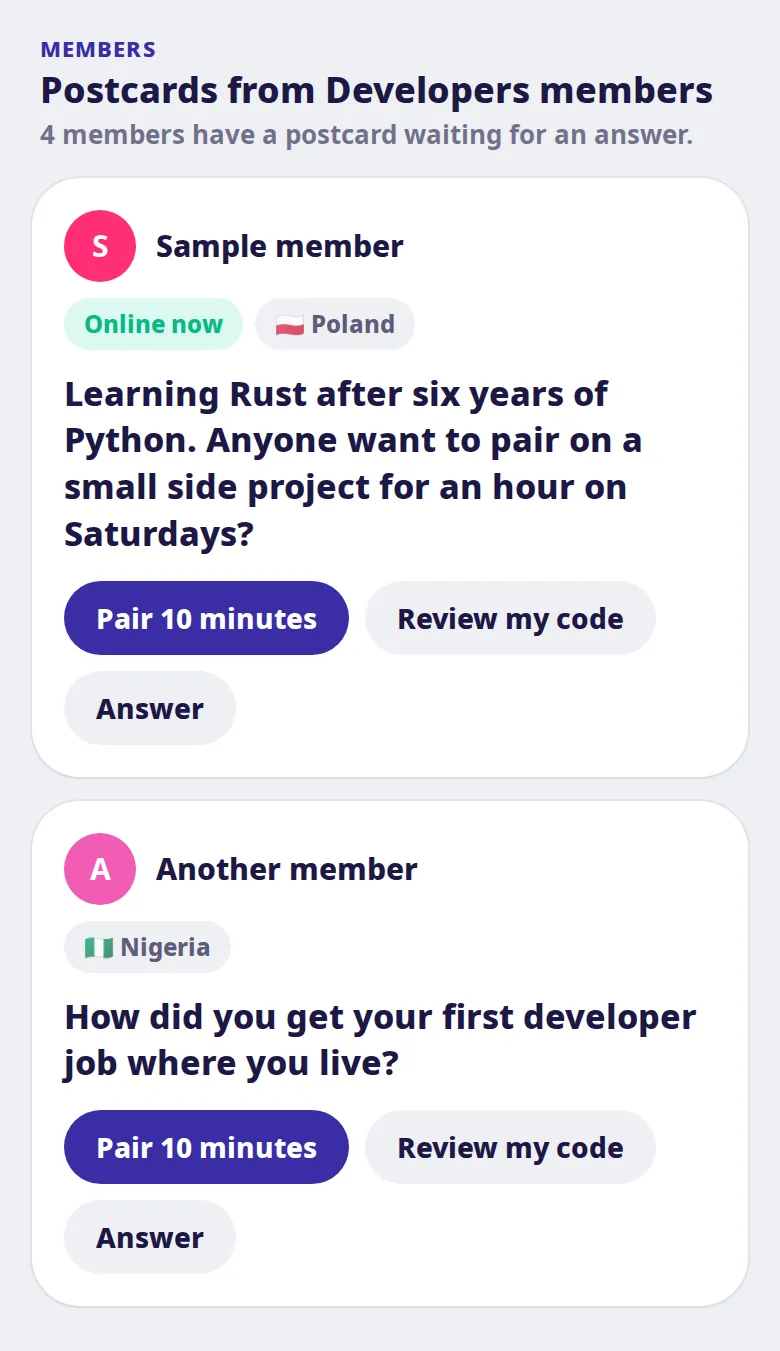 Example screen with sample members, not real people.
A few honest details:
- It's text only. No screen share, no voice and no video. You describe the problem, paste a short snippet or error message, and talk it through in messages. If you both want to pair properly later, move to a tool you both pick, once you trust each other.
- Every message is translated both ways, with the original visible, so your buddy doesn't need to share your first language. Code and error messages are easier to read in the original anyway.
- It's a small community. At quiet hours, nobody may answer straight away.
- Report and block are in every chat, and contact details are stopped before delivery.
If a coding buddy turns into a friend, good. Make friends from other countries online has more on keeping those connections going.
What never to share with a coding buddy
People you meet online are mostly what they seem. Still, code is where real damage is easy to do, so keep a few rules:
- No credentials, ever. No passwords, API keys, tokens, SSH keys or
.envfiles, not even "just for a minute". If you paste a snippet, check it for secrets first. If one slips out, rotate it straight away. - No access to private or work repositories. Invite a new buddy to a public repo or a fresh one you made for the project. Your employer's code is usually not yours to share.
- No remote control of your machine with someone you've only just met.
- Never pay for "mentoring" or "job placement" that a stranger offers you in a chat, and never send money.
- Run unknown code carefully. Read a script before you run it, and don't install packages or extensions a stranger sends you without checking them.
For general habits when talking to people online, see random text chat safety tips.
When a coding buddy isn't working
- One person always drives. Use a timer and swap at every break, no exceptions.
- Sessions turn into chats. Fine at the start or end. During the block, code.
- Your goals drifted apart. Say so and finish the current milestone, then part on good terms. You can still swap the odd review.
- They keep cancelling. Mention it once, kindly. If nothing changes, post again and find someone else. That isn't failure; most people try two or three partners before one sticks.
Questions people ask
+What is a coding buddy?
A coding buddy is another programmer you code with on a regular schedule. You might pair on the same code, review each other's pull requests, build a side project together, or just work at the same time and report what you finished. The name is also used by several AI coding assistants, but here it means a person.
+Where can I find a coding buddy?
Start where people already learn together: the freeCodeCamp forum, The Odin Project's Discord, course groups, local meetups and the r/ProgrammingBuddies subreddit. Open source issues labelled 'good first issue' are another way in. Say your language, level, goal and the hours you're free.
+Should my coding buddy be at my level?
For a learning partnership, roughly yes. Pairing guides recommend someone close to your level so both people get to drive. A more senior developer works better as a mentor or reviewer, which is a different arrangement.
+Does pair programming actually help?
There is some evidence, but it's limited. A well-known 1999 experiment with about 40 senior computer science students found pairs spent about 15% more developer hours and wrote about 15% fewer bugs. Most of the research is small and student-based, so treat it as encouraging, not proven.
+Is it safe to share code with a coding buddy I met online?
Share code you're happy to make public, through a repo or link you control. Never share passwords, API keys, tokens, .env files, or access to a private or work repository with someone you haven't built trust with. Your employer's code usually isn't yours to share at all.
Keep reading
Boarding pass · free
Tap, fly to a random country, and chat with someone who lives there.
Text first, translated both ways, no video, no coins to meet people. Works in your browser.
Take off on OluNew here? Read Ablo App: The Complete Story of the Chat App That Let You Fly Anywhere (2019–2022), the full history in one place.